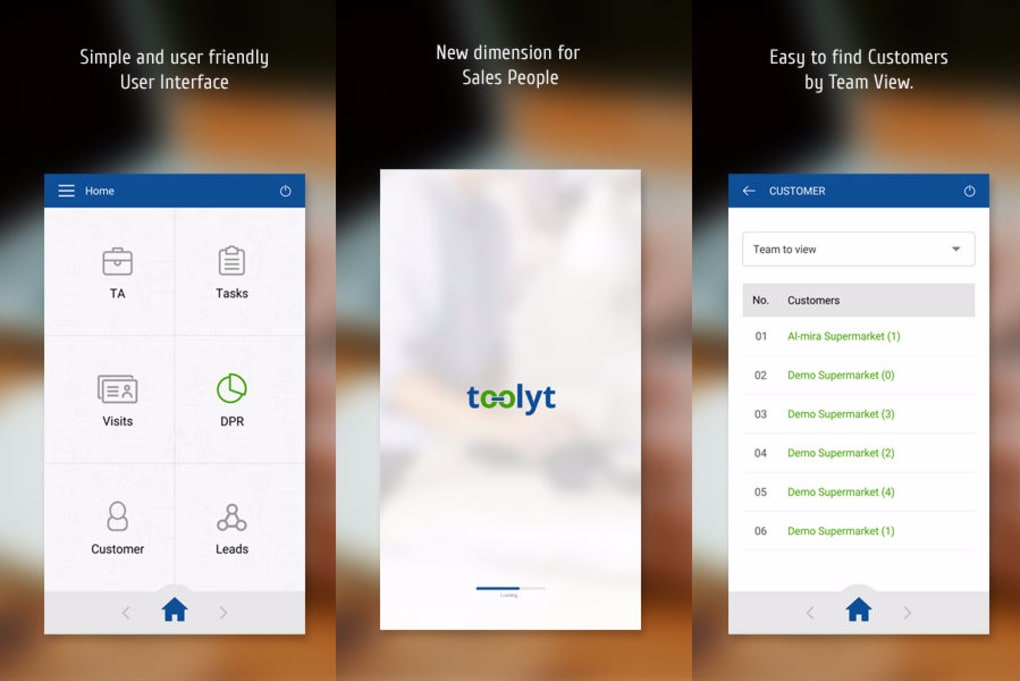

Download Toolyt – sales automation, CRM, free, secure, Windows, Mac, Android, iOS
Overview – Why Toolyt Is Gaining Traction in 2025
In today’s hyper‑competitive marketplace, businesses are constantly looking for ways to trim overhead, accelerate sales cycles, and keep customer data tidy. Toolyt positions itself as a hybrid solution that blends a powerful Customer Relationship Management (CRM) system with a full‑featured sales‑team project manager. Built on a cloud‑native architecture, Toolyt promises to save time, money, and resources by automating repetitive marketing tasks, generating data‑driven sales projections, and streamlining field operations through its patented Toolyt Field Automation (FFA) engine.
The platform’s design is centered around “raw data ingestion” – the more accurate and comprehensive the information you feed it, the smarter the automated insights become. From assigning reps to the right territory, to automatically warming up prospects with personalized outreach sequences, Toolyt attempts to replace several disjointed tools with one unified interface. What truly differentiates Toolyt from generic CRMs is its focus on **team cohesion**.
Managers can create hierarchical groups, allocate resources to specific locations, and monitor real‑time performance dashboards. When the sales team consistently updates their activities, the system can pinpoint bottlenecks, forecast revenue with a confidence interval, and even suggest optimal follow‑up times based on historical patterns. Security is another pillar of the offering.
All data is encrypted at rest and in transit, with role‑based access controls that ensure only authorized personnel can view sensitive leads or financial projections. The platform also supports single sign‑on (SSO) integrations with Azure AD, Google Workspace, and Okta, making it a safe choice for enterprises that demand strict compliance. In short, Toolyt aims to be the “Swiss army knife” of sales automation: a single, secure, cloud‑first tool that can replace separate CRM, project management, and field‑automation solutions while delivering actionable intelligence.
The following sections dive deeper into its feature set, installation process, system compatibility, and real‑world pros and cons.
Key Features – What Sets Toolyt Apart
- Unified CRM & Project Management: Combines lead tracking, pipeline visualization, and task assignment in one dashboard.
- Toolyt Field Automation (FFA): AI‑driven prospect warming that auto‑generates outreach sequences based on lead behavior.
- Dynamic Sales Projections: Real‑time forecasting powered by machine‑learning models that adapt to new data inputs.
- Team & Territory Mapping: Drag‑and‑drop interface to assign sales reps to regions, accounts, or specific campaigns.
- Secure Cloud Architecture: End‑to‑end encryption, role‑based permissions, and SSO integration with major identity providers.
- Custom Workflow Automation: Visual builder for triggers, actions, and conditions that automate routine tasks without code.
- Integrated Communication Hub: In‑app email, SMS, and chat logging to keep every interaction attached to the correct record.
- Mobile‑First Experience: Native iOS and Android apps that sync offline activity the moment a connection is restored.
- Analytics & Reporting Suite: Pre‑built dashboards for pipeline health, conversion rates, and team productivity.
- Third‑Party Connectors: Ready integrations with HubSpot, Salesforce, Zapier, and major ERP systems.
Each of these features is designed to reduce the friction that often plagues sales organizations. For example, the FFA engine eliminates the need for manual list‑building by scanning public directories, social profiles, and past engagement data to suggest warm leads. Meanwhile, the visual workflow builder allows managers to set up “if‑this‑then‑that” rules—such as automatically assigning a follow‑up task when a prospect opens an email three times—without needing a developer.
The platform’s reporting suite is also noteworthy. Unlike traditional CRMs that only show raw numbers, Toolyt overlays predictive analytics, giving managers a confidence band around revenue forecasts. This enables more informed budgeting and resource allocation decisions.
Security and compliance are baked in. Every data point stored in Toolyt is encrypted using AES‑256, and audit logs capture every change, satisfying SOC 2 and GDPR requirements. The SSO capability means you can leverage existing corporate credentials, reducing password fatigue and potential breaches.
In practice, these features translate into tangible benefits: shorter sales cycles, higher win rates, and reduced administrative overhead. The next section walks you through how to get Toolyt up and running on your devices.
Installation & Usage – Getting Started in Minutes
Step‑by‑Step Installation
Installing Toolyt is intentionally straightforward to encourage rapid adoption across teams. Follow these steps for a hassle‑free setup:
- Visit the Official Download Page: Navigate to toolyt.com/download and select the installer matching your operating system (Windows, macOS, Android, or iOS).
- Run the Installer: For desktop platforms, double‑click the
.exe(Windows) or.dmg(Mac) file. The wizard will guide you through license agreement acceptance and install location selection. - Create Your Account: After installation, launch Toolyt and click “Sign Up.” You can register with an email address or use SSO via Azure AD, Google Workspace, or Okta.
- Verify Email & Set Up MFA: A verification link will be sent to your inbox. Follow the link and enable multi‑factor authentication for added security.
- Import Existing Data: Use the built‑in CSV importer or connect directly to your existing CRM via the “Connectors” tab. Toolyt will map fields automatically, but you can fine‑tune mappings if needed.
- Configure Teams & Territories: Navigate to the “Organization” module, create departments, and assign users to specific regions or campaigns using the drag‑and‑drop map.
First‑Run Usage Tips
Once the platform is live, a few best‑practice steps will ensure you extract maximum value:
- Complete Your Profile: Add a photo, role, and contact information. This improves internal collaboration and external client trust.
- Set Up Default Pipelines: Choose from pre‑built sales stages (Lead → Qualification → Proposal → Close) or customize them to reflect your unique process.
- Activate the FFA Engine: Turn on “Prospect Warm‑Up” in the Automation Center. Define the target industries and let the AI suggest outreach cadences.
- Schedule a Training Session: Toolyt offers live webinars and on‑demand videos. A 30‑minute walkthrough for the whole team reduces adoption friction.
- Monitor the Dashboard Daily: The homepage shows key metrics—pipeline value, activity count, and upcoming tasks—so you can act quickly on bottlenecks.
The mobile apps follow the same login flow and sync automatically with the cloud, ensuring that field reps can update opportunities on the go, even offline. All changes are queued and pushed to the server once a network connection is re‑established, keeping the central database consistent. By following these steps, you’ll have a fully operational Toolyt environment in under an hour, ready to drive sales efficiency across the organization.
Compatibility & System Requirements – Where Toolyt Runs Best
Toolyt is a cross‑platform solution designed to work seamlessly on the most common operating systems used by sales teams worldwide. Below is a breakdown of supported environments and minimum hardware specifications.
Desktop Compatibility
- Windows 10 (64‑bit) or later: Requires .NET Framework 4.8, at least 4 GB RAM, and 500 MB of free disk space for the core application.
- macOS 11 (Big Sur) or later: Built with Electron, it needs 4 GB RAM, 500 MB storage, and macOS Gatekeeper enabled for secure installation.
Mobile Compatibility
- iOS 13 or later: Optimized for iPhone and iPad, with push notifications and offline sync capabilities.
- Android 8.0 (Oreo) or later: Supports both smartphones and tablets, with background data refresh for real‑time updates.
Browser Access
In addition to native apps, Toolyt offers a fully responsive web portal accessible via modern browsers:
- Google Chrome (latest version)
- Mozilla Firefox (latest version)
- Microsoft Edge (Chromium‑based)
- Safari 14+ (macOS only)
Network & Security Requirements
- Outbound HTTPS (port 443) must be open for API communication and updates.
- For on‑premise deployments (available on Enterprise plans), a VPN tunnel or dedicated private link is recommended.
- Supported authentication protocols: SAML 2.0, OAuth 2.0, and OpenID Connect for SSO.
Because Toolyt stores all data in a secure, ISO‑27001‑certified cloud, you do not need to maintain local servers. However, organizations with strict data‑residency policies can request a dedicated EU or US region instance during the purchase process. In summary, whether your team works from a Windows laptop, a MacBook, an iPhone, or an Android tablet, Toolyt provides a consistent, high‑performance experience with minimal hardware overhead.
Pros, Cons & Frequently Asked Questions
Pros
- All‑in‑one CRM, project management, and field automation reduces the need for multiple subscriptions.
- AI‑driven prospect warming saves hours of manual research each week.
- Real‑time predictive analytics improve forecasting accuracy.
- Robust security with encryption, audit logs, and SSO integration.
- Cross‑platform support (Windows, macOS, iOS, Android) and responsive web portal.
- Extensive third‑party integrations via Zapier, HubSpot, Salesforce, and ERP connectors.
- Highly customizable workflow builder without requiring code.
Cons
- Initial data migration can be time‑consuming for large legacy databases.
- Advanced AI features (FFA) are only available on the Professional and Enterprise tiers.
- Learning curve for teams unfamiliar with unified CRM/project management tools.
- Limited offline capabilities on the web portal (requires desktop or mobile app).
FAQ – Answers to Common Queries
Is there a free version of Toolyt?
Toolyt offers a 14‑day free trial with full feature access. After the trial, you can continue with the Basic plan, which includes core CRM and project management functions at no cost, though advanced AI automation requires a paid subscription.
Can Toolyt integrate with my existing Salesforce CRM?
Yes. Toolyt provides a bi‑directional connector for Salesforce that syncs leads, contacts, and opportunities. Data mapping can be customized in the “Connectors” section to ensure fields align correctly.
What security certifications does Toolyt hold?
Toolyt’s cloud infrastructure is ISO‑27001, SOC 2 Type II, and GDPR‑compliant. All data is encrypted at rest with AES‑256 and in transit via TLS 1.3. Role‑based access controls and audit logs are built‑in.
How does the Toolyt Field Automation (FFA) engine work?
FFA leverages machine‑learning models that analyze public data sources, previous campaign performance, and engagement signals to generate warm leads. It then creates personalized outreach sequences (email, SMS, LinkedIn) that are automatically queued for the assigned sales rep.
Is there offline support for the mobile app?
Yes. The iOS and Android apps allow users to view and edit records while offline. Changes are stored locally and synchronized with the cloud as soon as an internet connection is restored.
Conclusion – Is Toolyt Right for Your Business?
Toolyt delivers a compelling blend of CRM, project management, and AI‑driven field automation—all under a single, secure cloud umbrella. For small‑to‑mid‑size teams seeking to eliminate tool sprawl, the Basic plan offers enough functionality to streamline daily workflows without breaking the bank. Enterprises that need advanced forecasting, custom AI scenarios, and dedicated data residency will find the Professional or Enterprise tiers a worthy investment.
The platform’s biggest strengths lie in its automation capabilities and unified interface, which together can shave hours off manual data entry and prospect research. However, organizations must commit to keeping data current and allocate time for initial migration to fully reap the benefits. If you’re ready to boost sales productivity, reduce administrative overhead, and gain predictive insights, download Toolyt today and start your free trial.



.png)



